
Face Roulette
How to pick a random person from a group photo
Quick answer
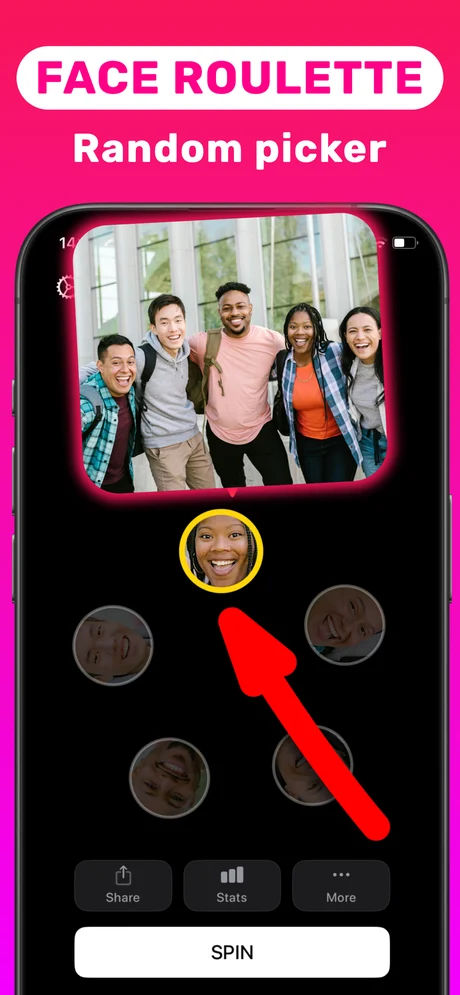
Use Face Roulette in Spinner Wheel Names: take a photo of the group, the app cuts out each face as an entry, then tap Spin and one face is highlighted as the pick. It is the fastest random person picker when everyone is in the same room, because nobody has to type or spell names.
Typing ten names into a wheel takes longer than the decision itself. When the people are standing in front of you, a photo already contains everything the picker needs: one face per person.
Face Roulette turns that photo into a picker made of faces. It is the feature facespinner.com is named after, and it is especially good for parties, classrooms and team meetings.
Why picking from faces works better than names
People recognise themselves instantly, so the result needs no explanation. There are no typos or nicknames to argue about, and nobody who was in the photo can be "forgotten" off the list. It is also more fun: the moment the highlight stops on a face gets a reaction a name never does.
Getting a good photo for Face Roulette
- Make sure every face is visible and roughly facing the camera.
- Use decent light; very dark or backlit photos make faces harder to find.
- Fit everyone in one frame. For a large group, step back or ask people to stand in rows.
- Check that every person appears as a face before you spin.
Where people use it
- Parties: who takes the next dare, who picks the music.
- Classrooms: which student answers, presents or goes first.
- Work: who runs the stand-up, takes notes or presents a demo.
- Family: who washes up or chooses the movie.
Step by step: Face Roulette
Everyone needs to be in the photo.
-
1
Open Face Roulette
Install Spinner Wheel Names from the App Store and choose Face Roulette.
-
2
Take the group photo
Frame everyone so each face is clearly visible, and take the photo.
-
3
Check the faces
Each face from the photo appears as an entry. Make sure nobody is missing.
-
4
Spin
Tap Spin. One face is highlighted: that person is picked.

Do it in Spinner Wheel Names
Free on the App Store. Pick a tool, add the players, spin.
Tips
- Taking the photo in front of everyone shows the draw is fair.
- If someone is missing from the faces, retake the photo with better light or a clearer angle.
- For remote groups, use the Custom spinner with typed names instead.
Questions people also ask
Do I need to type names for Face Roulette?
No. The faces in the photo are the entries, which is the whole point of the feature.
What if a face is not detected?
Retake the photo with everyone facing the camera in better light, or use the Custom spinner with typed names.
Does Face Roulette identify people?
No. It only finds where the faces are in your photo so it can use them as entries; it does not recognise who anyone is.
Spinner Wheel Names is a random picker for fun and everyday decisions. It is not meant for regulated lotteries or gambling.